Is there an international export invoice format?
Not really because there is always something unique about each country’s customs and tax documents.
Learn How to generate invoices for exports to foreign clients, the distinction between commercial invoices and proforma invoices, examine an export invoice sample, and learn about the distinct labeling of taxes on different invoice templates. Create high-quality export invoices for your foreign clients using the Sleek Bill Online service.
An export invoice is invoice type which records a sale to an overseas means international customer. In the case of goods transportation, a commercial export invoice helps to understanding and identification of the goods being delivered, along with their value and the parties to the transaction. Service invoices detail the services rendered and the payment terms; the exemption does not cover them at all.
Define the items accurately, determine who will be the purchaser and the consignee, and specify the quantity, price, currency used, and delivery terms. Destination-specific entries must be confirmed with the importer or freight forwarder prior to shipment.
Describe the project, service period or milestone, the agreed price and currency, due date and payment instructions. Determine the applicable tax treatment separately from the customer’s country or billing currency.
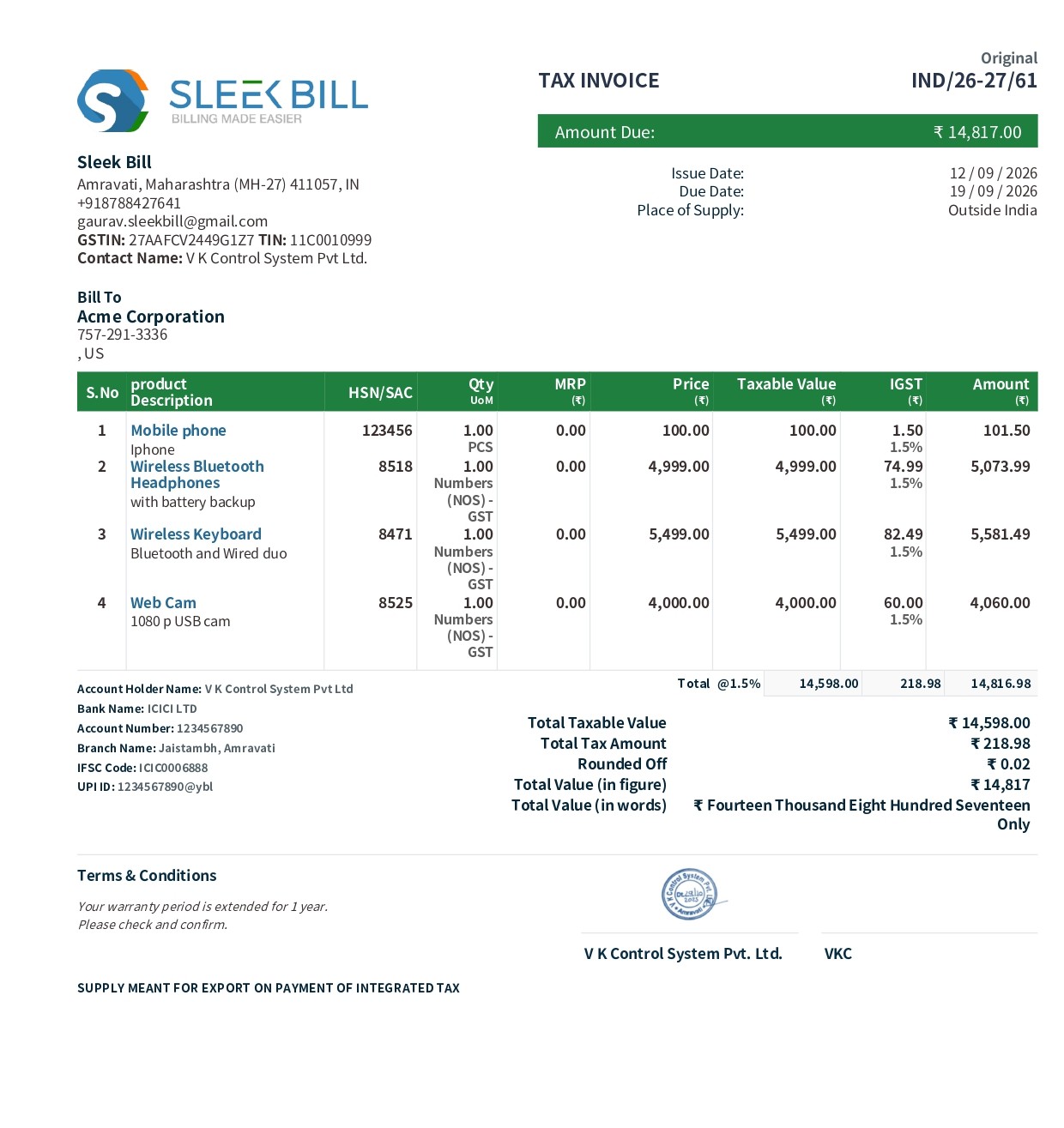
The numbered preview is an Indian GST export sample. India-specific GSTIN, HSN/SAC, IGST, LUT and INR terms appear below. Export invoice for professionals requires information on the seller, the buyer, delivery, currency, products, payments and exports.
 1
2
3
4
5
6
7
8
9
10
11
12
13
14
A clear heading such as Export Invoice, Commercial Invoice, or Tax Invoice identifies the document and its purpose.
A unique invoice number and invoice date help maintain proper records, track payments and identify the export transaction. The invoice may also include the due date where applicable.
Your business logo provides professional branding and makes the export invoice easily recognizable to overseas customers.
It contains details like the business name of the exporter, his business address, contact number, email address Tax id number, etc. It helps in identifying the seller.
Details like the name, address, contact details, etc., of the foreign importer or consignee will be included here. If required, we can include Bill to and Ship to or Consignee details separately.
For example, exports from India, there might be information about country of supply, place of loading, place of discharge, shipping bill number and date, E-Way bill number and transporter details, etc.
For international transactions, the invoice can specify the invoice currency and applicable exchange rate. Product prices and invoice totals may be presented in the foreign currency as well as INR, where required.
Lists the products or services being exported along with item description, HSN/SAC code, quantity, unit of measurement, unit price, discount, taxable value and total amount. This provides a clear breakdown of the exported goods or services.
Shows the total taxable value, applicable IGST or other taxes where applicable, discounts, additional charges and final invoice value. For export transactions, the invoice can also indicate whether the supply is made under LUT/Bond without payment of integrated tax.
Displaying the final invoice amount in words helps clearly communicate the payable value. For export invoices, the amount can be shown in the invoice currency and INR, where applicable.
Bank details help overseas customers make payments. These may include beneficiary name, bank name, account number, branch, IFSC code and SWIFT/BIC code or other applicable international banking details.
Contains important business terms such as payment terms, delivery conditions, warranty provisions, return conditions and other terms applicable to the export transaction.
The invoice can include the applicable export declaration, such as a statement indicating that the supply is meant for export under Bond or Letter of Undertaking without payment of Integrated Tax, where applicable.
An authorized signature, digital signature or company stamp can be used to authenticate the invoice and confirm that it has been issued by the exporter.
Fictional goods transaction for understanding the fields. This is an educational example, not a Sleek Bill screenshot or a universal customs template.
EXP-2026-104
Issued 23 October 2026 · Due 22 November 2026
Harbour Studio Ltd (fictional)
10 Example Street, London, United Kingdom
Maple Retail Inc (fictional)
20 Sample Avenue, Toronto, Canada
| ③ Description | Quantity | Unit price | Line value |
|---|---|---|---|
| Cotton tote bags, model CT-01 | 100 pieces | USD 8.00 | USD 800.00 |
| Freight agreed with buyer | 1 | USD 120.00 | USD 120.00 |
④ Total amount before any applicable tax: USD 920.00
⑤ Delivery:delivery term agreed, place of delivery, origin, verified HS classification and weights and packages have to be completed for the shipment.
⑥ Payment: transfer into our bank within 30 days; beneficiary, account number and SWIFT/BIC should be completed. Reference EXP-2026-104.
| Document | Main purpose | What to check |
|---|---|---|
| Commercial invoice | Records the sale; used in customs clearance for goods. | Actual goods, value, currency, parties and destination requirements. |
| Proforma invoice | Preliminary offer in invoice form, used before the final sale or shipment. | Estimated terms, validity and clear “proforma” label. It does not automatically replace the final commercial invoice. |
| Country-specific tax invoice | invoice Satisfies the seller’s requirements for tax documentation . | Mandatory identification numbers, tax classification, currency, and e-invoicing, if any. |
These purposes can overlap: a single final invoice may serve commercial and tax purposes when it contains the required information. Indian GST, LUT, IGST and IRN requirements are regional features, not worldwide invoice standards.
Reference: US International Trade Administration — commercial invoices and proforma invoices. Confirm the rules for your own export and import markets.
The published Online guide documents the following route. Available fields depend on your business configuration and edition.
Open Customers → New. Add the customer’s name, country, billing and delivery addresses, currency and applicable tax details. Save the record.
Open Invoices and create a new tax invoice. Select the customer. The Indian Online workflow exposes export details for the applicable overseas transaction.
Enter items or services, quantities, prices and currency. Where the export fields apply, review the conversion rate, export type and shipping-bill information.
Check addresses, amounts, currency, payment instructions and regional tax statements before saving and sharing the PDF. A foreign customer address alone does not establish export tax eligibility.
Product references: customer setup guide and Indian Online export workflow.
Sleek Bill documentation shows INR, USD and EUR currency-code or symbol display. A published Online export sample also shows AED and a conversion-rate field. These examples are not an exhaustive supported-currency list.
Confirm the currency you need in your edition before subscribing. Currency display does not mean a payment gateway is included.
For example, USD 920 × an assumed USD conversion in INR 83 per USD = INR 76,360. This is a learning calculation, not a live, real and current rate or a product-generated accounting result.
Verify the direction, date and source of any rate you enter. Do not assume automatic live rates, automatic foreign-exchange gains or losses, or multi-currency bank accounting.
Explore multi-currency invoicing →
Currency evidence: currency display tutorial; published AED export sample. Check pricing or request a demo to verify edition and plan availability.
The templates below are Indian GST examples. They are not universal VAT, sales-tax or customs forms for every country.
CGST Rule 46 requires the applicable export endorsement and recipient, delivery-address and destination-country particulars. An export under bond or LUT without payment of integrated tax is different from an eligible export on payment of integrated tax.
The route selection must not be made according to a template which is already available. The transaction itself must be determined as whether it falls under such type of transaction.
Check the fields of tax invoice, Tax Id, series number, date of invoice, HSN/SAC code, value of items, quantities and taxes payable, additional shipping, customs etc.
SEZ supplies and exports are not interchangeable labels. An overseas customer or a foreign currency does not by itself prove an export of services.
Official reference: CBIC — CGST Rule 46. Guidance reviewed 23 October 2026; consult current official requirements for the actual transaction.
Populated India-specific samples in PDF, Word and Excel. Replace the sample business, item and payment details; verify tax treatment before use.

View the populated Indian export invoice sample in PDF. Review it before printing or sharing.

Review and edit this Indian export sample in Word. Replace all demonstration details.

Review the Indian export sample in Excel. Contains sample values, with no calculation formulas. Check and build calculations before reuse.
View the populated Indian export invoice sample in PDF. Review it before printing or sharing.
Review and edit this Indian export sample in Word. Replace all demonstration details.
Review the Indian export sample in Excel. Contains sample values, with no calculation formulas. Check and build calculations before reuse.
Sleek Bill Export Invoice Software supports product exporters, service exporters, manufacturers, freelancers and international traders with export-ready invoicing, multi-currency billing and organized international transactions.

Export products with specifications, batch numbers and package details for international customers.

Invoice machines, spare parts and technical equipment for global customers with clear invoice records.

Include fabric details, roll numbers, GSM, colour and other product information in export invoices.

Create export invoices for agricultural products, food processing businesses and international buyers.

Create service export invoices for international clients, software companies and IT businesses.

Manage multiple products, countries and currencies across international export transactions.
The Sleek Bill allows small companies to create professional invoices for their exports to foreign buyers. Different currencies and different invoice fields depending on the country of export are supported by it, with the latter being incorporated into the relevant workflow process for easier export management and record keeping.
Furthermore, businesses have the ability to create invoice PDFs, send them to foreign clients, and monitor their payments all from the same place. Using easy-to-use invoicing and export management services, the Sleek Bill saves time for small business owners.
Not really because there is always something unique about each country’s customs and tax documents.
A proforma generally sets out proposed terms before the final transaction. Prepare the final invoice with the actual sale and shipment details.
Published Sleek Bill examples show INR, USD, EUR and AED. Check the available currency selector in your edition; no universal currency count is claimed here.
The documented export workflow has a conversion-rate field. Automatic live rates and foreign-exchange accounting have not been established by that evidence; confirm these capabilities separately.
No. They are Indian GST concepts. The downloads on this page are explicitly India-specific.
They are populated samples. Replace demonstration details, check the calculations and review applicable requirements before issuing a document.
Banking details on an invoice provide payment instructions. They do not establish support for any particular payment gateway or settlement currency.
Yes, it is possible since the invoice describes the service provided to the client. Whether it counts as an export under applicable legislation is to be determined.
Create clear invoices for international customers. Review currency, delivery information and payment instructions, with tax requirements checked for your country.