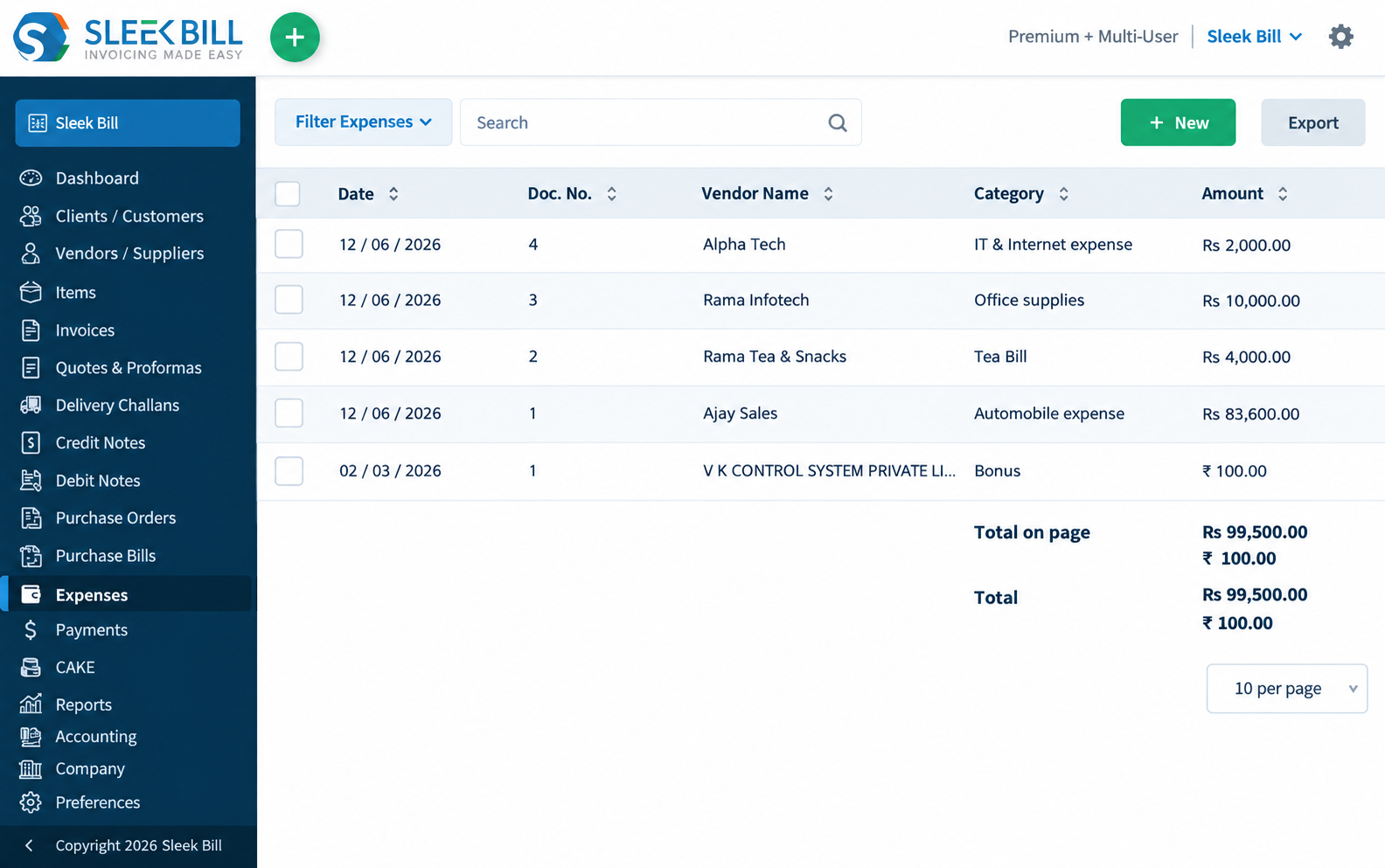
Open Expenses and choose New
Sign in into Sleek Bil, select Expenses tab in the sidebar, then click on New button. Keep the supplier reference available so you can check for an existing entry.
Record business costs, organize expenses by category, and review vendor spending with Sleek Bill Online. Keep daily expense records alongside your billing workflow.
Expenses is listed in Online Multi User · USD $99/year
See plans and free-plan limits
Take control of where your money goes. With Sleek Bill Online, you can track every payment to vendors, tag each cost with a category, and see exactly when you spent it—all in a tidy list. Filters and export options make sorting and sharing easy. Pair this with your invoices and purchase records, and you’ll always know what’s happening with your business finances.
Start with the supplier’s receipt or bill. Enter the cost once, choose a consistent expense name and review the saved record before including it in your reporting.
Sign in into Sleek Bil, select Expenses tab in the sidebar, then click on New button. Keep the supplier reference available so you can check for an existing entry.
Select the vendor, check the number and date, and choose the payment method available in your account. Add the expense line, quantity, price and applicable tax, then Save.
Use clear expense names, such as Office supplies or IT & Internet expense. Check how the entry appears in the Category column so similar costs remain easy to find.
Open Filter Expenses and use Vendor name, Expense no or Category. Review the list and use Export when you need the data outside the app.
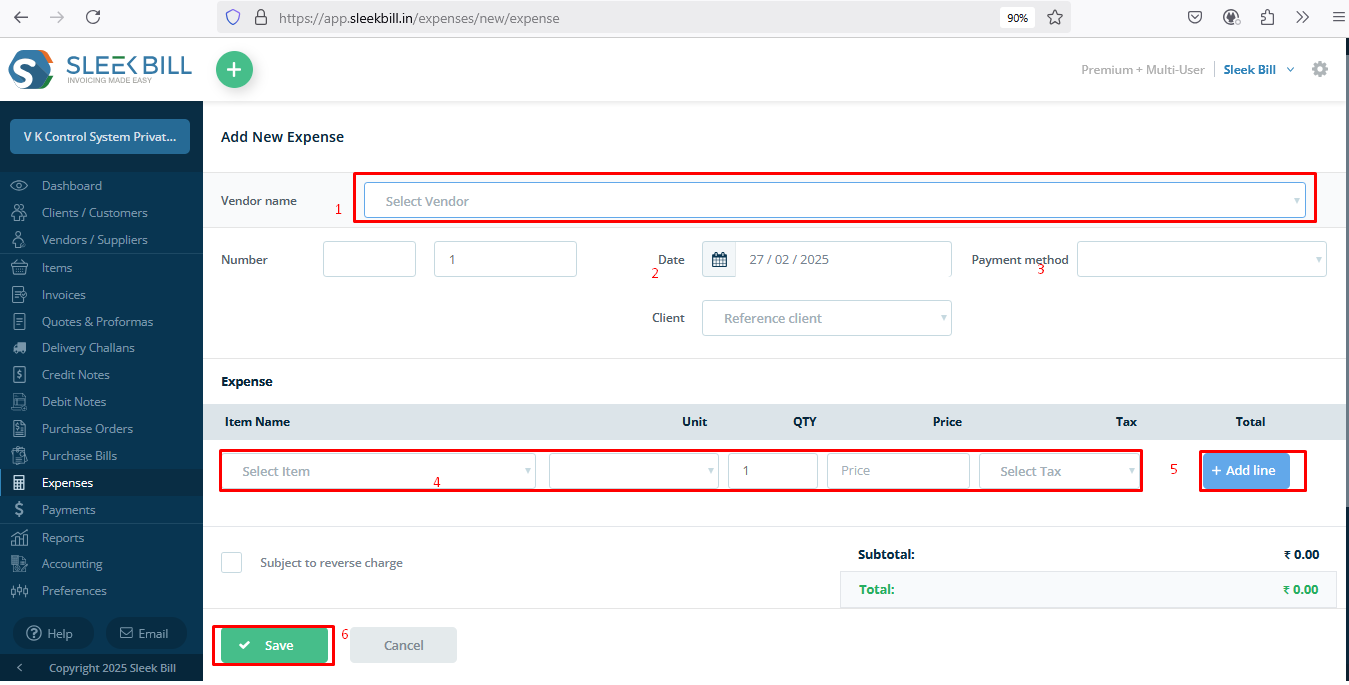
From the screenshots, you get a peek at what the app can do for expense management. Still, it doesn’t scan receipts, sync bank transactions by itself, handle recurring expenses, or let you approve employee expenses. So, you’ll need to keep your receipts and organize them with your business records to stay accurate.
Recording a cost and recording how it was settled are different tasks. Avoid entering the same supplier charge twice.
| Record | Use it for | Example | What to check |
|---|---|---|---|
| Expense | A categorized operating cost. | Internet service or office supplies. | Vendor, date, expense name, amount and tax. |
| Purchase bill | Recording goods or services received from a supplier, including item-based purchasing. | A delivery of items purchased for resale. | Supplier invoice reference, quantities and stock-tracking settings. |
| Payment | Recording money received or paid to settle a balance. | A bank transfer settling a supplier bill. | Correct party, amount and the document being settled. |
A payment is not a second expense. An operating-expense entry should not be assumed to add inventory. Use the appropriate purchasing workflow and review its stock effect. Explore purchasing · Explore inventory
Use the published category filter to narrow the expense list. The visible controls include Vendor name, Expense no and Category; a date-range filter is not established by this screenshot.

Review recorded costs alongside your payment records. An expense total is not the same as the cash paid during the period. Alaways expenses shuld lessen than payment received.
You can use the Category filter, like Advertising & Marketing or Automobile expense, IT and Internet Expenses, Refreshment and Beverages to narrow down your review by cost type.
With the multi-user plan, you’ll see Profit & Loss listed. Check it against your actual expense and purchase records, not just by category totals those alone won’t give you a true net profit.
If you stay organized, your reports will make more sense, audits will be easy and effortless, and you’ll be able to make decisions faster.
Track rent, electricity, internet, office supplies, maintenance, and daily administration costs.
Organize business travel and staff-related costs. A separate employee submission or approval workflow is not established here.
Separate operating costs from purchase bills, then reconcile their payment records.
Monitor fuel, delivery, courier, vehicle maintenance, and shipment-related expenses.
Control advertising, promotions, online campaigns, event costs, and branding spends.
Record software subscriptions, IT services, hosting and other technology costs; review the treatment of equipment separately.
Record day-to-day running costs with consistent names and categories for later review.
Record one-time, occasional, and exceptional business expenses without losing visibility.
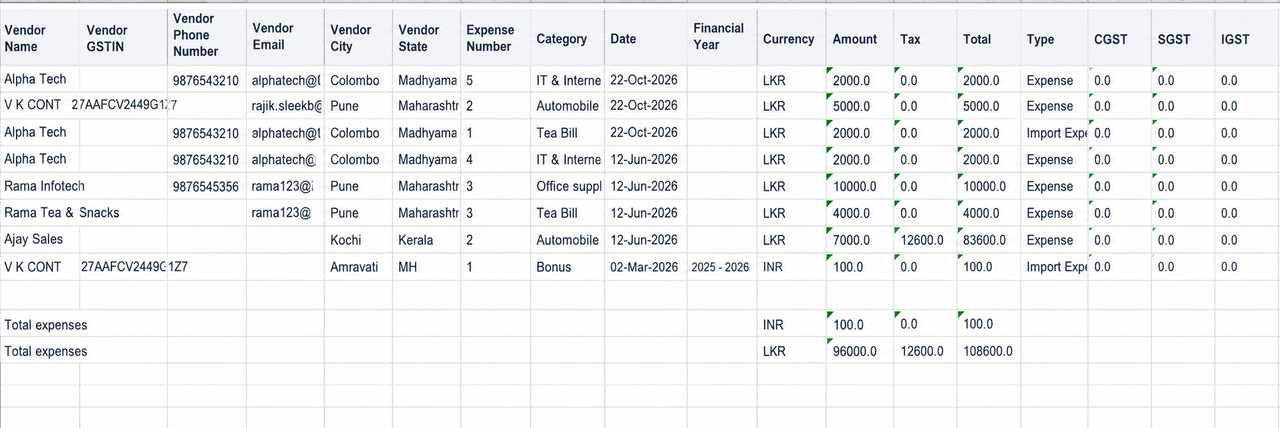
A worked example based on the Alpha Tech row in the published expense export. The export identifies the currency as LKR; it is a sample transaction, not a tax-rate recommendation.
Match the supplier, date and amount to the source receipt. Select the account’s correct payment method; the sample export does not show which method was used.
Keep comparable internet costs together. Similar names such as “Internet” and “IT & Internet” can make a manual review harder.
Filter by Alpha Tech, expense number 4 or the category. Check the date and value on the saved row.
The illustrated row has amount 2,000, tax 0 and total 2,000. Do not combine totals across different currencies without a documented conversion basis.
Sleek Bill makes this a whole lot easier. It keeps everything—your receipts, payments, and reports—together and organized, so you don’t have to dig around when you want a clear view of where your money’s going.
Monitor store operations, inventory expenses, and supplier payments.
Track production, procurement, maintenance, and factory costs.
Manage supplier bills, logistics expenses, and bulk purchasing costs.
Control project expenses, travel costs, and client-related spending.
Track food purchases, staff costs, utilities, and vendor payments.
Monitor equipment, consumables, operational, and administrative costs.
Manage administrative, facility, event, and department-level expenses.
Control delivery, warehouse, staff, and branch-level expenses.
Replace scattered receipts, registers, and spreadsheets with organized, searchable, and report-ready expense data.

Small businesses don’t need fancy ERP software. They need something straightforward and affordable. Sleek Bill gives owners everything they need to manage expenses professionally—no special accounting expertise required.
The published spreadsheet spells it all out: vendor details, expense number, category, date, currency, amount, tax, and total.
Use expense records alongside invoicing, purchasing and the reports available in your plan. Choose the appropriate record for each transaction and review local tax requirements separately.
Understand both income and outgoing business costs from the same platform.
Use purchase bills and stock-tracking settings for inventory purchases. An operating expense should not be assumed to add stock.
Generate practical reports that help owners, accountants, and finance teams.
The published expense export explicitly includes a Currency column and LKR entries. This verifies an LKR example; it does not establish a complete list of selectable expense currencies.
Check the currency on the expense and exported row before comparing totals. Invoicing currency features should not be assumed to apply identically to expense entry.
Read the invoice currency-display guide →Ask for a demonstration using your required expense currency, account setup and reporting currency. Confirm how conversion is handled; an automatic exchange-rate feed was not established by the reviewed screens.
Request a currency demonstration →Indian GST, reverse-charge fields, GSTR reporting, IRN/e-invoicing and e-way bills are regional features. Their presence does not establish tax filing or local compliance support in another country.
India e-invoicing features →The global Online comparison explicitly lists Expenses in Multi User. Prices below are in US dollars, with annual billing for paid plans. Checked 19 October 2026.
10 documents per month, with Sleek Bill branding. Expenses is not explicitly listed for this plan.
Review free-plan limits →Unlimited documents and basic reports. Expenses is not explicitly listed in this plan’s published feature list.
Compare included features →Up to 5 users, with Expenses, purchase bill entry, ledgers and Profit & Loss listed in the plan.
View Multi User details →Confirm current taxes, renewal terms and your required workflow before purchase. Online and Desktop are separate products and licences. View the current pricing comparison.
Use the appropriate expense name when entering the cost, then check the Category column on the saved record. The published filter lets you narrow results by Category.
Yes, Export is shown on the expense list and a spreadsheet example is published. The file extension and every available export option are not established by the screenshots; check the account’s export control.
The expense-specific evidence reviewed here demonstrates LKR. Ask for a demo of your required currency rather than relying on currency examples from invoicing pages.
Do not assume it does. For stock purchases, use the applicable purchase-bill workflow and check your inventory settings.
The global pricing list explicitly names Expenses under Multi User. The free plan has a 10-document monthly limit and does not explicitly list the Expenses module.
Sleek Bill Online needs an internet connection. On the desktop version, don’t forget it’s a separate product. Check which expense features come with it, and make sure your license covers what you need before counting on it offline.
Organize business costs and review your expense workflow with Sleek Bill Online. Check the required currency and plan with our team.