Create Professional GST Credit Notes with Ready Templates
Create GST-compliant Credit Notes with professional designed Credit Note templates in Sleek Bill. Record product returns, process refunds, make adjustments to invoices, correct incorrect billing mistakes and more – all from a single GST compliant system.
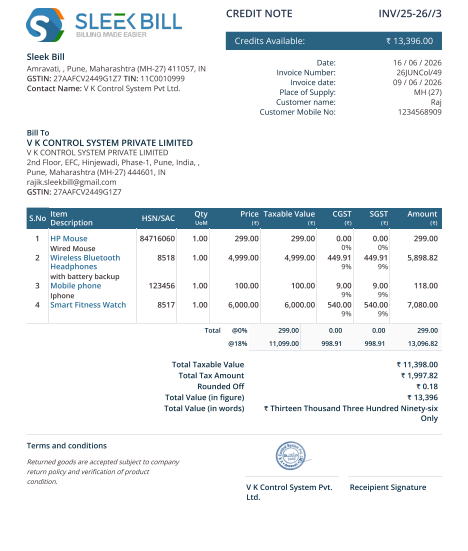
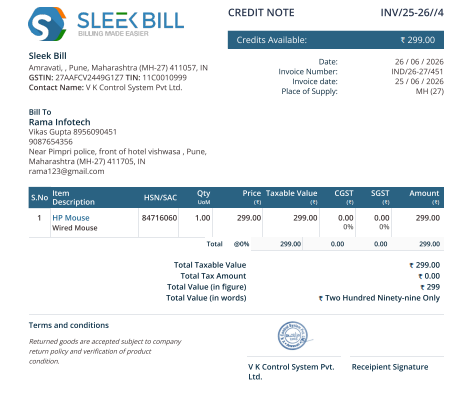
A Credit Note, also called a Credit Memo, is an official document issued by a seller to reduce or cancel the value of an already issued invoice.
It serves as proof that the seller has agreed to reduce the amount payable by the customer due to product returns, damaged goods, excess billing, pricing mistakes, discounts, order cancellations, service cancellations, GST adjustments, or invoice corrections.
Secure customers, accounting records and GST compliance
Protect customers, accounting records and GST compliance
A Credit Note also. Rectify invoicing errors without damaging customer relationships. Provide forward-looking information that ensures the correct treatment of GST. Record refunds attributable to the sale. Maintain inventories at accurate levels. Provide complete audit trail
Without Credit Notes, businesses often struggle to reconcile invoices, returns, refunds, customer balances.
Credit Note Template Explained
Understand Every Important Field in a Credit Note Format
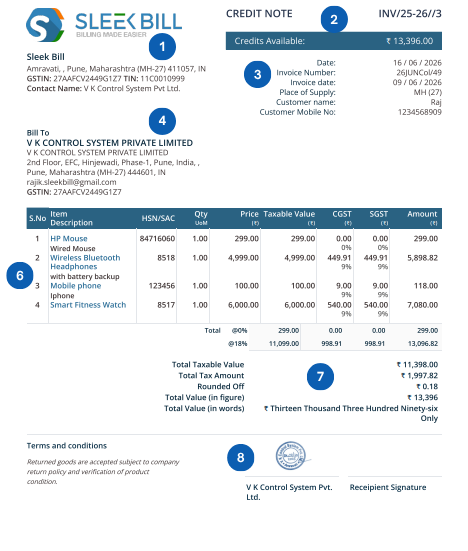
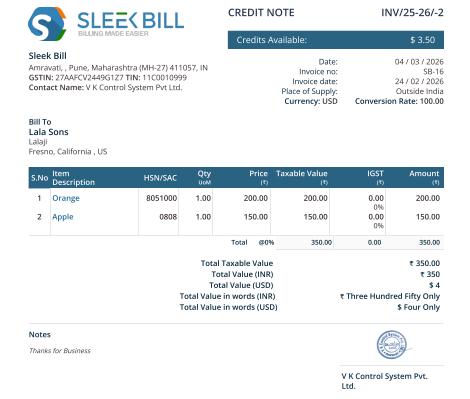
Use this sample Credit Note layout as a visual guide. Each arrow explains what that part means and why it is required for customer clarity, GST records, accounting and audits.
Company & GSTIN
Shows the seller’s legal identity, GSTIN, address and contact details.
Credit Note Number & Date
Unique document number and issue date make the Credit Note traceable.
Original Invoice Reference
Links the Credit Note to the invoice being reduced or corrected.
Customer Information
Identifies the customer account where the credit value will be adjusted.
Reason & Refund Status
Explains why the Credit Note is issued and whether refund is pending or completed.
Item Table
Shows returned products, corrected quantities, rate, GST and item-wise credit amount.
Tax Summary
Displays taxable value, GST adjustment and total credit amount.
Declaration & Signature
Confirms business approval and makes the document professional.
Downloadable Template Designs
Credit Note Templates for Every Business Situation
These are dummy downloadable template cards created for design placement. Replace these files later with your actual PDF, Excel, Word, or HTML template downloads.
GST Template
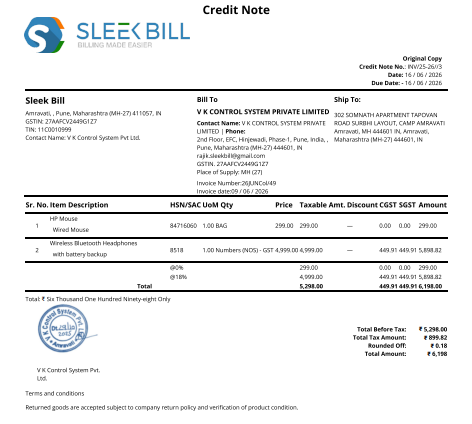
GST Credit Note Template
For GST registered businesses with tax breakup and invoice reference.
Every Credit Note follows a clean, professional structure that clearly explains the invoice adjustment and its GST impact.
Header Section
Includes company details, company logo, GSTIN, Credit Note number and Credit Note date. This section establishes document identity and business authenticity.
Customer Details Section
Includes customer name, GSTIN, billing address, shipping address and contact details so the adjustment is linked to the correct customer account.
Invoice Reference Section
Shows original invoice number and invoice date. This is one of the most important fields because every Credit Note should clearly refer to the original invoice being adjusted.
Item Table Section
Displays product or service name, quantity, rate, discount, taxable value, GST rate and item-wise credit amount.
Summary Section
Shows subtotal, GST amount, total credit amount, refund amount, and balance adjustment details.
Footer Section
Includes declaration, terms and conditions, refund notes, authorized signature, and any additional business message.
How Sleek Bill Works
Credit Note Workflow in Sleek Bill
This section explains the Sleek Bill workflow using dummy image placeholders. Replace these placeholders with actual Sleek Bill screenshots later.
1
Open the Credit Note Tab
Select the client User starts from the original invoice or return transaction so the Credit Note remains properly linked.
2
Select Items for Credit Note
Select returned products or services, update quantity, price, discount and GST adjustment.
3
Add Reason and Refund Details
Sleek Bill generates the Credit Note with document number, invoice reference, tax breakup and total credit value.
4
Share, Print or Export PDF
Share the Credit Note with customer and maintain a professional record for GST and audit purposes.
Step-by-Step Workflow
Create a Credit Note Step by Step
Sleek Bill makes Credit Note creation simple for teams, accountants and business owners.
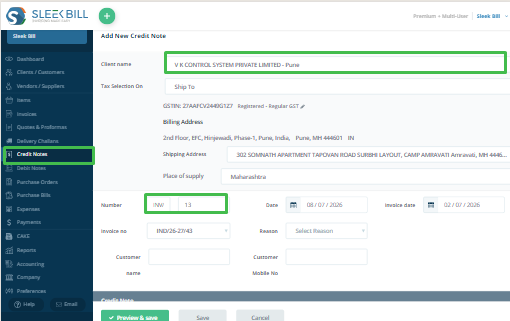
Create New Credit Note
Go to dashboard and select Credit Note tab click on new button
Select Clinet
Choose the client against which the Credit Note needs to be created.
Select Original Invoice
Choose the invoice against which the Credit Note needs to be created.
Add Items and Reason
Select products/services, quantity, rate, reason and adjustment notes.
Review GST Impact
Check CGST, SGST, IGST, Cess and total credit amount.
Choose reason
Select reasn like, refund, sale return, difficieancy in service, correctio in invoice or change in POS.
Generate Cedit Note
Selelct template and color for document. Create professional Credit Note document instantly.
Share PDF & Use Reports
Download PDF, print, or email the Credit Note directly.Review Credit Note register, GST reports and ledger reports.
Industries
Industries Using Credit Notes
Credit Notes are used across industries wherever product returns, service cancellations, invoice corrections or refund adjustments happen.
🏪
Retail Stores
Product returns, exchange adjustments and walk-in refunds.
📦
Wholesale
Bulk return adjustments and customer ledger corrections.
🏭
Manufacturing
Defective products, batch returns and quality issues.
🌍
Exporters
International invoice adjustments and multi-currency credits.
💼
Service Providers
Service cancellations, project adjustments and billing corrections.
🏥
Healthcare
Medicine returns, service corrections and billing reversals.
🛒
E-Commerce
Online returns, cancelled orders and platform refunds.
🚚
Distributors
Stock adjustments, damaged goods and supply chain returns.
These reports help businesses monitor return trends, refund obligations, customer balances, and GST impact.
Small Business Ready
Best Credit Note Software for Small Businesses
Small businesses require fast and accurate document generation without complexity. Sleek Bill helps generate Credit Notes, track refunds, manage returns, adjust GST, update ledgers, export PDFs and maintain audit trails.
Comparison
Credit Note Format in Excel vs Sleek Bill
Manual Excel Credit Notes can be error-prone, hard to track and difficult to reconcile with invoices.
Feature
Excel Credit Note
Sleek Bill
Calculations
Manual Calculations
Automatic
GST Adjustment
Manual GST
Automatic GST
GST Adjustment
Manual GST
Automatic GST
Invoice Linking
No Invoice Linking
Invoice Linked
Reports
No Reports
Advanced Reports
Error Risk
Error Prone
Accurate
Tracking
Difficult Tracking
Audit Ready
Why Businesses Choose Sleek Bill
GST-ready, template-rich and audit-friendly
Sleek Bill offers easy-to-use Credit Note creation, professional templates, automatic calculations, invoice integration, refund tracking, multi-user access, and cloud or desktop support.
Professional Format
Professional Credit Note Format for Growing Businesses
A well-designed Credit Note Format helps businesses maintain transparency, correct billing mistakes, adjust GST liability, manage refunds and keep customer accounts accurate.
FAQ with Dropdown
Frequently Asked Questions
Click any question to expand the answer.
A Credit Note reduces the value of an already issued invoice. It is used for returns, discounts, cancellations, refunds, GST corrections and invoice adjustments.
You should issue a Credit Note for product returns, damaged goods, wrong quantity billed, pricing mistakes, GST calculation errors, additional discounts, order cancellations, service cancellations and refund processing.
Yes. A GST Credit Note should include invoice reference, customer GSTIN, taxable value, GST breakup, Credit Note number, date and adjustment reason.
Yes. Sleek Bill supports invoice-linked Credit Notes, helping businesses maintain clear records and audit-ready adjustment history.
Yes. Businesses often issue a Credit Note first and then process the refund. Refund amount, mode, date and reference can be tracked as optional fields.
Yes. Sleek Bill allows PDF export and sharing of Credit Notes with customers through email or print.
Yes. Sleek Bill supports professional templates for GST Credit Notes, returns, refunds, services, exports, e-commerce and other business needs.
Universal fields include company information, Credit Note number, date, original invoice reference, customer information, item details, credit amount, GST details, reason, refund information, declaration and signature.
Ready to Create Professional Credit Notes?
Generate GST-compliant Credit Notes, manage returns, process refunds, update customer balances, and maintain complete GST compliance with Sleek Bill.